網頁前端 3
楓資-戴瑢溱
Index
Js簡介
JS簡介
JavaScript (簡稱JS)
- 一種網頁程式語言
- 處理網頁的行為 (互動與操作)
- 可連結HTML與CSS
≠ Java

前端三件套
很強啊JS簡介
<!DOCTYPE html>
<html lang="en">
<head>
    <meta charset="UTF-8">
    <meta name="viewport" content="width=device-width, initial-scale=1.0">
    <title>hehehe</title>
    <link rel="stylesheet" href="檔名.css">
</head>
<body>
    <script src="檔名.js"></script>
</body>
</html>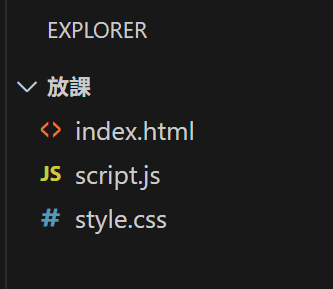
HTML
在VS Code中創建3個檔案
- 檔名.html
- 檔名.css
- 檔名.js
! + Tab
連結js檔
JS簡介
打開網頁 !
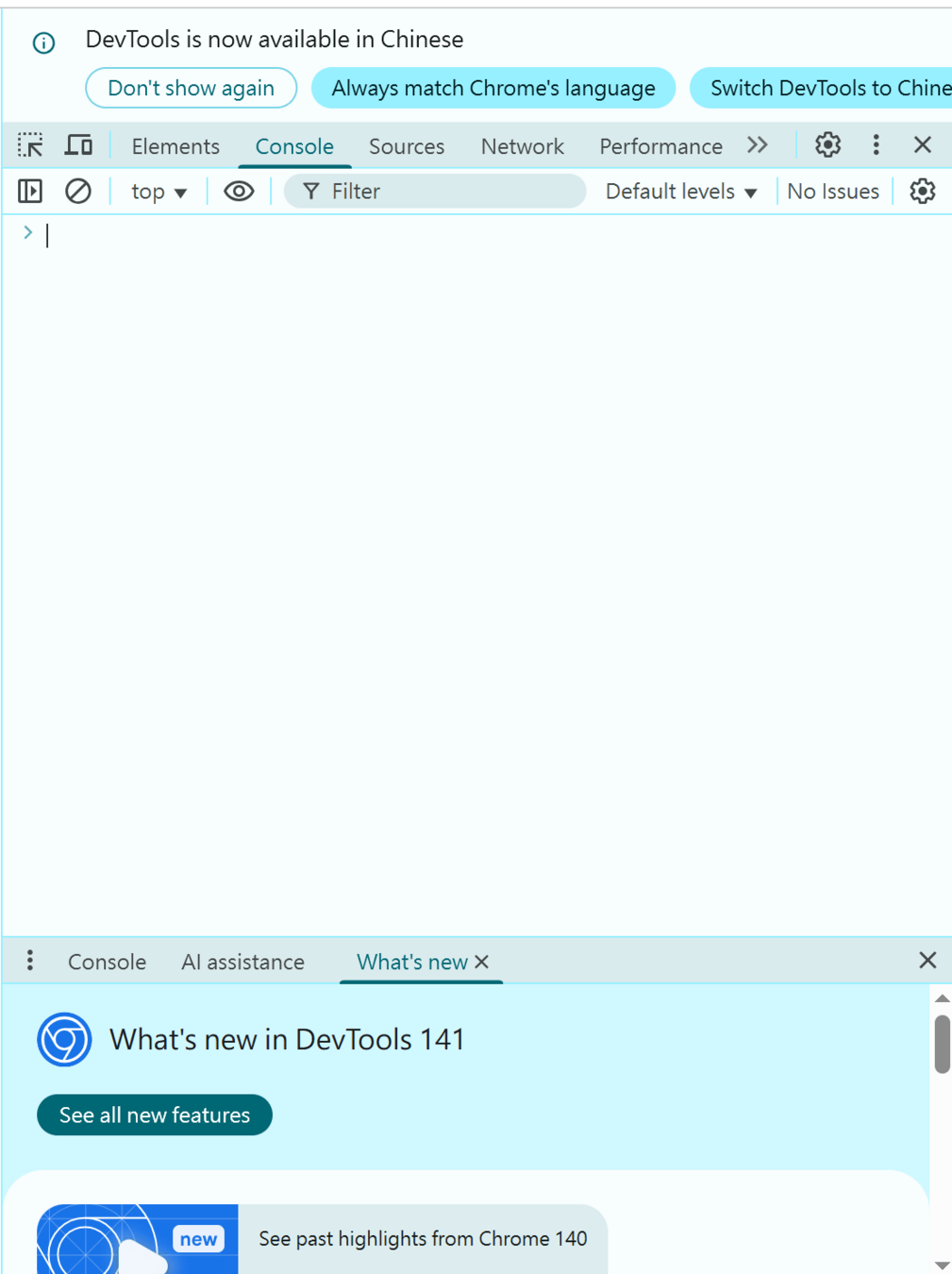
按F12
打開Developer Tools中的Console
JS的輸出結果會出現在這裡 !!
JS簡介
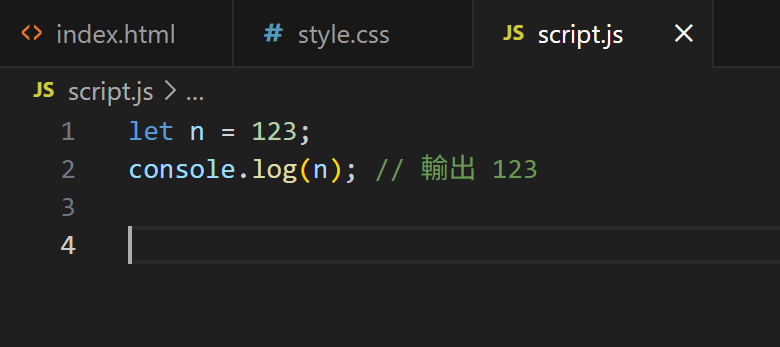
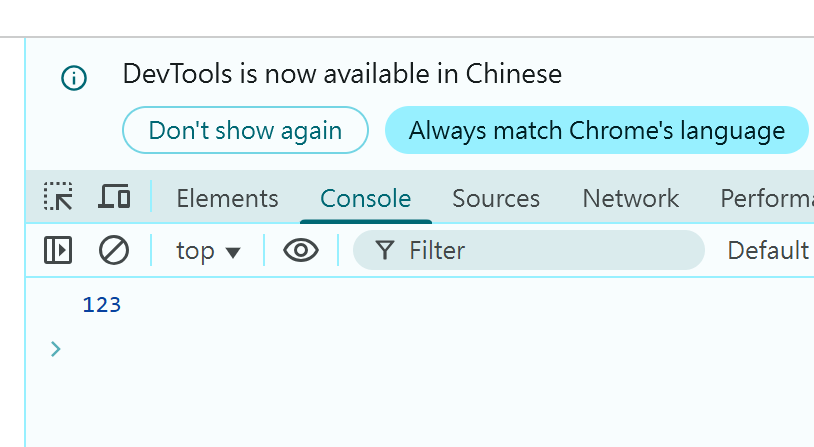
試試看吧~
可以看到輸出結果 !
變數
變數
-
用來存放資料的容器
- 特定資料型別 (數字、字串、布林值等)
- 使用保留字宣告
| 保留字 | 特點 | 是否可改變 | 範例 |
|---|---|---|---|
| let | 最常用的變數宣告方式 | ✔️可以 | let a = 5; |
| const | 用來放「固定不變」的資料 | ❌不行 | const b = "hehe"; |
| var | 舊寫法 現在比較少用 | ✔️可以 | var c = false; |
宣告 : 保留字 變數名稱;
賦值 : 變數名稱 = 值;
輸入 : 保留字 變數名稱 = prompt( "顯示的文字");
輸出 : console.log(變數名稱);
let n;n = 456;console.log(n);let a = prompt("請輸入名字");變數 - 保留字
let a; //宣告
console.log(a); // undefined 未定義

a = 123; //賦值
console.log(a); // 輸出 123

var b = 456; // 宣告並賦值
console.log(b); // 輸出 456

const c;
c = 789;
console.log(c); // 錯誤 必須在宣告時賦值 (const c = 789;)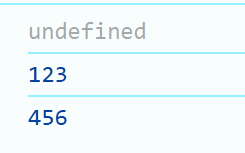
| 保留字 | 特點 | 是否可改變 | 範例 |
|---|---|---|---|
| let | 最常用的變數宣告方式 | ✔️可以 | let a = 5; |
| const | 用來放「固定不變」的資料 | ❌不行 | const b = "hehe"; |
| var | 舊寫法 現在比較少用 | ✔️可以 | var c = false; |
變數 - 命名規則
-
只能使用英文字母、數字、底線(_)、錢號($)
- 不能用保留字 (if, for, let...)
- 不能以數字開頭
- 大小寫有區分
let at;           // ✅ 英文字母
let coco1;        // ✅ 數字
let wa_wa_wa;     // ✅ 底線
let $octopus;     // ✅ 錢號
let 1monkey;      // ❌ 不能以數字開頭
let bling;        // ✅
let Bling;        // ✅ 大小寫為不同變數
資料型別
資料型別
-
變數的資料種類
- 數字(Number)、字串(String)、布林值(Boolean)、未定義(Undefined)、空值(Null)
- 物件(Object)、陣列(Array)
console.log(typeof 116); // number
console.log(typeof "izcc"); // string
console.log(typeof true); // boolean
使用 typeof 辨別資料型別
資料型別 - 數字
數字(Number)
- 包含整數與浮點數
- 可進行運算
let zsisc = 32;
let pi = 3.14;

let sum = 32 + 38; // 70
let ans = 10 % 3; // 1(餘數)
資料型別 - 字串
字串(String)
- 用一對單引號(')或雙引號(")包起來
- 不能混搭單雙引號
- 可使用 , 隔開文字
- 可使用 + 串接文字
let i = 'infor';  // ✅
let z = 'zsisc';  // ✅
let c1 = "ckcsc"; // ✅
let c2 = "cmioc"; // ✅
let us = "izcc';  // ❌
console.log(i, z); // infor zsisc
console.log(c1 + c2); // ckcsccmioc資料型別 - 布林值
布林值(Boolean)
- 只有2種值 true(1) 與 false(0)
- 常用於條件判斷
let isZsisc = true;
if (isZsisc) {
  console.log("妳是可愛的楓資學妹!");
}
資料型別 - 未定義
未定義(Undefined)
- 已宣告但尚未賦值的變數的原始值
let color;
console.log(color); // Undifined

color = "Yellow";
console.log(color); // Yellow
資料型別 - 物件
物件(Object)
- 由多個「屬性 : 值」組合而成
- 用大括號( {} ) 包起來
let infor = {
  name: "INFOR",
  year: 38,
  isClub: true
};
console.log(infor.name);    // INFOR
console.log(infor.year);    // 38
console.log(infor.isClub);  // true
資料型別 - 陣列
陣列(Array)
- 可存放多個資料的大容器
- 用中括號( [] ) 包起來
let chihuahua = ["仙人掌", "香菜", "土娃", "ㄇㄇ"];

console.log(chihuahua[0]);       // 輸出: 仙人掌
console.log(chihuahua.length);   // 輸出: 4

chihuahua.shift();               // 移除第一個值
console.log(chihuahua);          // 輸出: ["香菜", "土娃", "ㄇㄇ"]

chihuahua.pop();                 // 移除最後一個值
console.log(chihuahua);          // 輸出: ["香菜", "土娃"]

chihuahua.unshift("土撥鼠");      // 插入新的值到最前面
console.log(chihuahua);          // 輸出: ["土撥鼠", "香菜", "土娃",]

chihuahua.push("晶姐");          // 插入新的值到最後面
console.log(chihuahua);          // 輸出: ["土撥鼠", "香菜", "土娃", "晶姐"]

chihuahua[1] = "大姐頭";          // 修改索引值為1的值
console.log(chihuahua);          // 輸出: ["土撥鼠", "大姐頭", "土娃", "晶姐"]
條件判斷
條件判斷
-
讓程式能根據條件執行不同的動作
- 「如果……就做……,否則就做……」
if (條件) {
  // 當條件為真(true)時執行這裡
} else {
  // 當條件為假(false)時執行這裡
}
條件判斷
let score = 85;

if (score >= 60) {
  console.log("及格!");
} else {
  console.log("不及格 QQ");
}
let score = 85;

if (score >= 90) {
  console.log("優秀");
} else if (score >= 60) {
  console.log("及格");
} else {
  console.log("不及格");
}
範例 :
條件判斷 - 運算子
-
算術運算子 -
比較運算子
-
邏輯運算子
條件判斷 - 運算子
-
算術運算子
| 運算子 | 意義 | 範例 | 結果 |
|---|---|---|---|
| + | 加 字串相接 |
2 + 3 "ab" + "cd" |
5 abcd |
| - | 減 負號 |
7 - 4 - 3 + 2 |
3 - 1 |
| * | 乘 | 3 * 6 | 18 |
| / | 除 | 9 / 5 | 1.8 |
| % | 餘數 | 8 % 5 | 3 |
| ++ | 遞增1 | let x = 3; x++; | 4 |
| -- | 遞減1 | let x = 5; x--; | 4 |
| ** | 指數 | 4 ** 3 | 64 |
條件判斷 - 運算子
-
比較運算子
| 運算子 | 意義 | 範例 | 結果 |
|---|---|---|---|
| == | 鬆散等於 | 5 == '5' | true |
| === | 嚴格等於 | 5 == '5' | false |
| > | 大於 | 3 > 2 | true |
| >= | 大於等於 | 4 >= 4 | true |
| < | 小於 | 2 < 1 | false |
| <= | 小於等於 | 5 <= 6 | true |
條件判斷 - 運算子
-
邏輯運算子
| 運算子 | 意義 | true true | true false | false true | false false |
|---|---|---|---|---|---|
| && | AND | true | false | false | false |
| || | OR | true | true | true | false |
| 運算子 | 意義 | !true | !false | !!!true |
|---|---|---|---|---|
| ! | NOT | false | true | false |
條件判斷 - rice
let age = 16;
let isStudent = true;

if (age < 18 || isStudent) {
  console.log("可享學生優惠");
} else {
  console.log("一般票");
}
範例 :
「 年齡 < 18」 或「是學生」可享學生優惠
條件判斷 - 題目
let num = Number(prompt("請輸入數字"));

if (num % 2 == 0) {
  console.log("even");
} else {
  console.log("odd");
}
題目 :
判斷奇偶數,若輸入為奇數輸出「odd」,若為偶數則輸出「even」。
迴圈
迴圈
- 重複執行一段程式碼
- for迴圈、while 迴圈、do-while 迴圈、for…of…
迴圈 - for迴圈
For迴圈
for(let 變數 = 初始值; 判斷式; 更新式){
	執行內容;
}
for (let i = 0; i < 5; i++) {
console.log(i); // 0 1 2 3 4
}適合處理連續、已知要重複幾次的資料
迴圈 - while迴圈
while迴圈
while (判斷式) {
  執行內容; // 只要條件為 true 就會重複執行
}
let i = 0;
while (i < 3) {
console.log("Hi"); // Hi Hi HI
i++;
}適合「不知道要重複幾次」但有條件控制的情況
迴圈 - do-while迴圈
do-while迴圈
do {
  執行內容; // 至少會執行一次
} while (判斷式);
let i = 0;
do {
  console.log(i); // 0 1 2
  i++;
} while (i < 3);
會至少執行一次再檢查條件
迴圈 - for...of...
for...of...
for (let 變數 of 陣列) {
  // 每次取出一個元素
}
let izcc = ["infor", "zsisc", "ckcsc", "cmioc"];
for (let x of izcc) {
console.log(x); // infor zsisc ckcsc cmioc
}
用來跑陣列
迴圈 - break/continue
break/continue
for (let i = 0; i < 5; i++) {
  if (i === 2) continue; // 跳過 i=2
  if (i === 4) break;    // 停止整個迴圈
  console.log(i);        // 輸出:0 1 3
}
break : 跳過整個迴圈
continue : 跳過該次迴圈
迴圈 - 題目
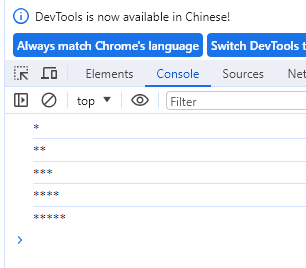
for (let i = 1; i <= 5; i++) {
  let line = "";
  for (let j = 1; j <= i; j++) {
    line += "*";
  }
  console.log(line);
}
題目 :
請撰寫一段程式碼,可以在輸出介面畫出由 *構成的三角形(如圖),使用 for 迴圈完成。
函式
函式
-
一段重複使用的程式碼
- 讓程式更乾淨、好管理
function 函式名稱(參數1, 參數2, ...) {
  執行內容;
  return 回傳值;
}
函式
沒有參數也沒有回傳值
function 函式名稱(參數1, 參數2, ...) {
  執行內容;
  return 回傳值;
}
function sayHello() {
  console.log("哈囉!");
}

sayHello(); // 呼叫函式 輸出:哈囉!
函式
有參數
function 函式名稱(參數1, 參數2, ...) {
  執行內容;
  return 回傳值;
}
function greet(name) {
  console.log("嗨," + name + "!");
}

greet("Ray"); // 嗨,Ray!
greet("Ethany"); // 嗨,Ethany!
函式
有回傳值
function 函式名稱(參數1, 參數2, ...) {
  執行內容;
  return 回傳值;
}
function add(a, b) {
  return a + b;
}

let result = add(5, 3);
console.log(result); // 8
函式 - 遞迴
function fibonacci(n) {
  if (n <= 0) return 0;
  if (n === 1 || n === 2) return 1;
  return fibonacci(n - 1) + fibonacci(n - 2);
}

let n = Number(pompt("輸入一個數字"));
console.log(fibonacci(n));
範例 :
輸入一個整數n,並輸出費氏數列第n項的值。
thanks !
網頁前端3
By ariel tai